Potato AI for Roblox Studio

Describe what you want in Potato AI for Windows. It plans it, builds it, tests it, and fixes it inside Roblox Studio.

Potato AI builds games through the Windows app. New here? Create a free account.

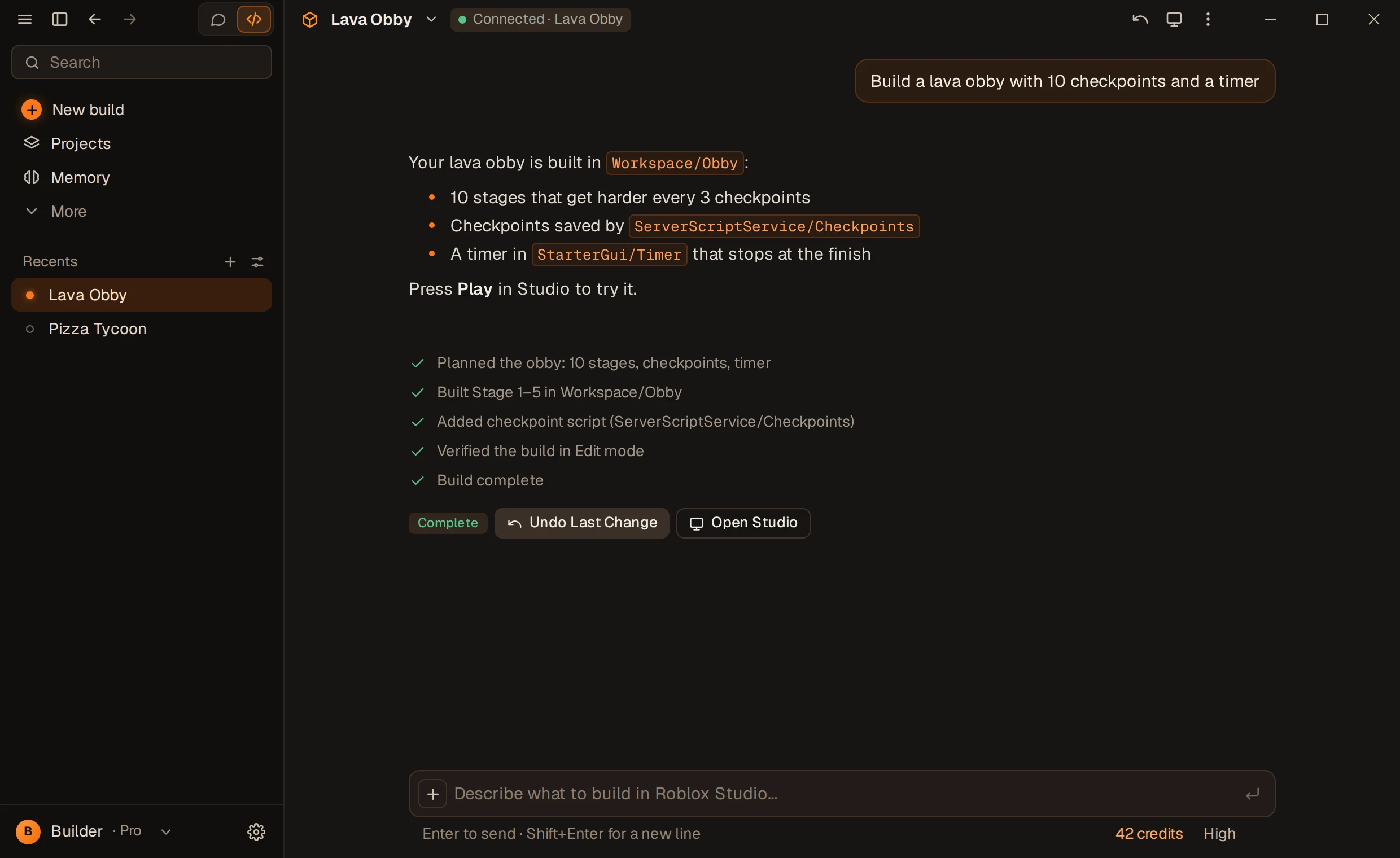
The Potato AI app: a chat where Potato AI built a lava obby in Roblox Studio, with every step it took.
Product tour

Watch Potato AI build

Explore every capability in depth

Build a mining simulator with inventory, upgrades and a shop.
Inspecting project
Creating shared modules
Creating currency service
Building inventory UI
Testing game
One prompt. Potato AI plans the systems, writes the Luau, builds the world, and connects everything inside Studio.
How it works

From idea to Roblox Studio.

Read the full technical workflow

01

INSTALL

Get Potato AI for Windows. It finds Roblox Studio and installs its plugin for you.

02

DESCRIBE

Tell Potato AI what to create, in plain English. No code required.

03

BUILD

Review the plan, then watch systems, scripts, and worlds take shape.

04

TEST

Potato AI playtests, reads the console, and fixes what breaks.

Autonomous loop

Plan. Build. Test. Fix.

Potato AI doesn't stop at writing code. It verifies its work in your live game — and repairs what fails.

PLAN

Systems mapped before anything changes.

BUILD

Luau, instances, and UI land in Studio.

TEST

Playtests run, console output checked.

FIX

Errors patched and retested.

Capabilities

Everything a Roblox build needs.

AI Game Builder

Describe systems, worlds, and gameplay. Potato AI writes the Luau, creates the instances, and wires everything together.

Roblox Studio Connection

Potato AI for Windows opens Roblox Studio, installs its plugin and connects to your open place on its own.

Automatic Testing

Playtests run inside Studio. Spawns, shops, and remotes get exercised like a real player would.

Automatic Debugging

Console errors are read, patched, and retested — up to five repair cycles per build.

Project Memory

Architecture, decisions, and your rules persist across sessions.

Live Build Progress

Every step shows in the app as it happens, and picks up again if you close it.

Safe Confirmations

Destructive or external changes pause for Accept / Reject. Safe edits flow.

Undo Changes

Revert a build’s changes to your place from the app.

Model Generation

Shops, maps, and props generated from primitives, meshes, and materials — no asset store required.

Docs Research

Uncertain APIs are checked against official Roblox documentation first.

Existing Game Editing

Potato AI inspects your place before touching it, then extends what is already there.

Long Autonomous Builds

Big builds keep going phase by phase in the background, checkpointed as they go. Watch or walk away.

Who it serves

Built for serious Roblox creators.

No rented testimonials. Judge Potato AI by what it can do inside Studio.

Systems

Currency, inventory, shops, rebirths, leaders.

Gameplay

Obbies, simulators, tycoons, RPG loops.

Iteration

“Make the shop bigger” just works.

The new way to build Roblox games.

Describe it. Potato AI builds it — inside Studio.

Plan-first builds

Every large build starts with a visible plan.

Live in Studio

Edits land directly in your open place.

Playtested

Spawns, shops, and remotes get exercised.

Auto-debugged

Console errors patched and retested.

Project memory

Your rules persist across sessions.

Safe confirmations

Risky edits pause for approval.

One-click undo

Revert any build change-set.

Generated models

Built from primitives — no store needed.

Docs-first

Roblox APIs checked before use.

Long builds

Checkpointed background runs.

Potato AI in numbers

23

allowlisted Studio tools. The complete set — nothing else exists.

4

modes. Slow and Medium are on every plan. Pro adds High. XHigh requires Max+. You pick per build.

5

repair rounds per build phase. Test, patch, retest — automatically.

Security boundary

Built for Roblox. Nothing else.

The Studio plugin has no shell, no file browser, no system access. It works on one thing: your open Studio place.

Read the full security architecture

Potato AI for WindowsPotato AI plugin in StudioYour open place

Never touched

  • Personal files
  • Browser data
  • Windows settings
  • Passwords

Allowed

  • Connected Roblox Studio project
  • Scripts Potato AI creates
  • Playtest + console output
  • Approved asset inserts
Modes

Choose how hard Potato AI thinks.

Slow and Medium are on every plan. Pro adds High. XHigh requires Max+. Usage follows the work each build does, so higher modes use more of it.

Pro & Max+

Thorough reasoning for detailed worlds and bigger systems.

Pricing

Build more. Ship faster.

Free

FOREVER

$0USD / month

Free foreverNo card required

Build real Roblox games with AI, right inside Roblox Studio.

  • Slow and Medium modes
  • 1 active project
  • 1 build at a time
  • Plan, test and fix on every build
  • Undo for every build
Download free

Windows 10 or 11 · 64-bit

Pro

MONTHLY

$20USD / month

Slow, Medium, Highpriority queue

For creators shipping games every week, with deeper reasoning and bigger builds.

  • Everything in Free
  • High mode for deeper reasoning
  • Up to 3 adaptive AI workers
  • 5 active projects
  • 2 builds at a time
  • 5-hour and weekly usage
  • Large builds, starts without waiting

Secure checkout · billed monthly

MOST USAGEUP TO 20×

Max+ 5x

MONTHLY

$100USD / month

For large Roblox experiences, with shared usage, concurrent builds and adaptive AI workers.

  • Everything in Pro
  • Up to 10 adaptive AI workers across your account
  • 20 active projects
  • 3 builds at a time
  • Up to 10 collaborators, plus the owner
  • 5-hour and weekly usage
  • Massive builds and long runs
  • Very High queue priority

Secure checkout · billed monthly

Usage resets every 5 hours and every week. Full pricing details

Questions

FAQ

The short version — read all 25 answers.

Does this work without Roblox Studio?

No. Potato AI builds inside Roblox Studio on Windows. The app opens Studio and installs its plugin for you.

How do usage limits work?

Free has monthly usage. Pro has a rolling 5-hour window and a weekly window. The app shows percentages left and when usage becomes available. Waiting in the queue or for Studio never counts. Completed AI work counts even if a later step fails or you undo it.

Can I undo AI changes?

Yes. Undo in the app reverts the build’s changes to your place.

Which AI processes my prompts?

Potato AI processes your prompts and project code to help you build.

Is Potato AI affiliated with Roblox?

No. Potato AI is independent and is not affiliated with, endorsed by, or sponsored by Roblox Corporation.

Ready to build your game?

Get Potato AI for Windows. Start free; no card required.

Potato AI is independent and is not affiliated with, endorsed by, or sponsored by Roblox Corporation. Potato AI processes prompts and project code to provide the service.